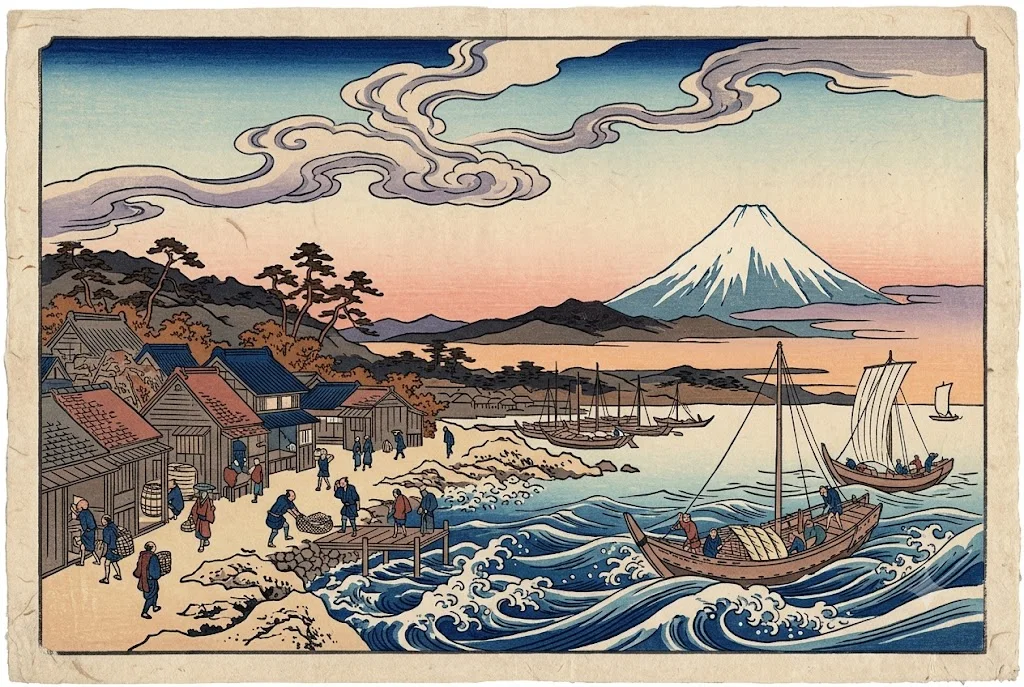
Ukiyo-e style woodblock print
An image in the style of a traditional Japanese woodblock print with bold lines and flat colour. Paste this prompt into ChatGPT, Gemini or Grok, change the parts in brackets to suit you, and generate.
- Written for
- ChatGPT, Gemini, Grok
- Status
- Tested 27 Sep 2026 in Gemini app (web), Flash mode with built-in image generation
- Test settings
- Default copy text pasted unchanged into a new Gemini chat. No reference image. First result used; only converted to WebP.
- Variability
- Layout, colours and small details change between runs. Gemini adds a small sparkle watermark in the corner.
Prompt
Scene: fishing boats returning to a small harbour in autumn wind, a snow-capped volcanic peak in the distance, stylised curling waves or clouds, small figures going about daily life.
Composition: strong diagonals, flat layered planes, large areas of sky.
Colour: Prussian blue, indigo, muted rust red and soft beige paper, with subtle bokashi colour gradation in the sky.
Technique: bold carved outlines, flat colour blocks, visible woodgrain and paper fibre texture, slight registration offset.
Style: traditional Edo-period woodblock print, original composition, not a copy of any famous print.
Format: horizontal 3:2
Avoid: copying famous prints exactly, readable Japanese text or seals, 3D shading, photorealism, modern objects, watermarks.
Customise
For example: fishing boats returning to a small harbour in autumn wind.
For example: 3:2.
Fields start with illustrative values; replace them with your own facts. The prompt updates as you type. Copy prompt copies your version.
How to use it
- Open an external image tool named above. Check Status for the provider actually tested.
- Paste the prompt. Replace anything in [BRACKETS] first, or use Customise.
- Send, then ask for small changes in follow-up messages.
How to use this prompt
- This prompt makes a new picture. Check the AI app named above and the real test recorded in Status.
- Fill Customise with what you want, or replace [BRACKETS] with the right details. Press Copy prompt and paste it into the image app you chose.
- When the picture is ready, check objects, hands, faces, writing and any detail that matters. Ask for one clear correction if something is missing.
Good to know
- Models sometimes add fake seals or calligraphy; ask for 'no seals or text' if they appear.