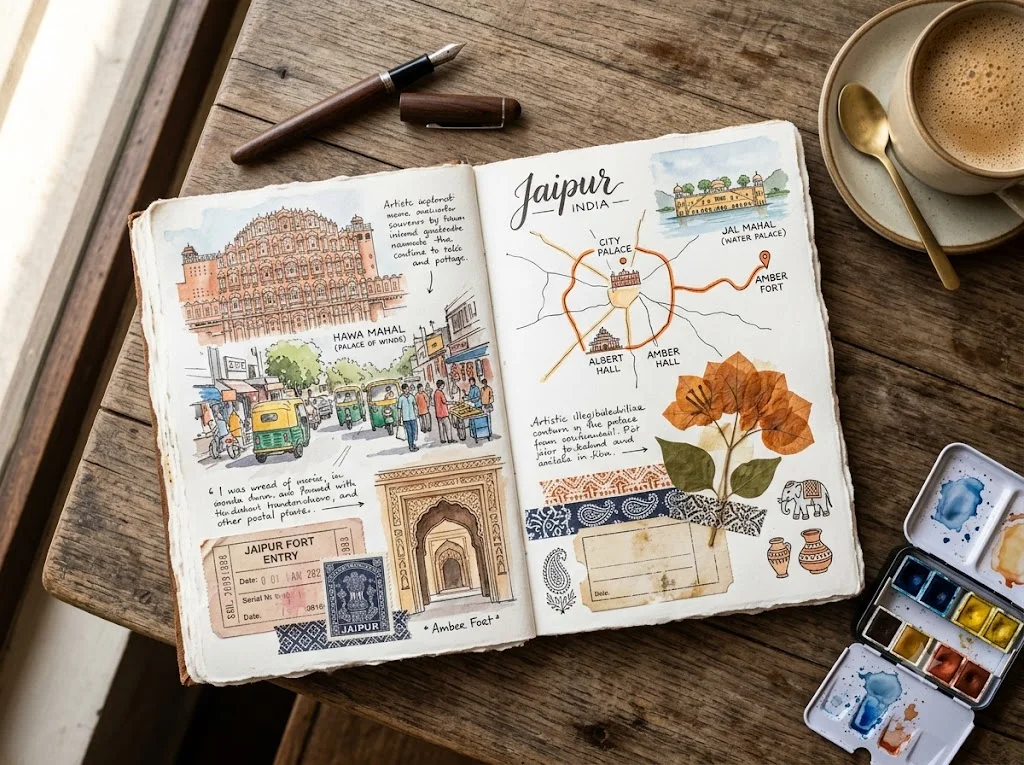
Travel journal scrapbook page
A flat-lay image of a handmade travel journal spread with sketches, tickets and pressed flowers. Paste this prompt into ChatGPT, Gemini or Grok, change the parts in brackets to suit you, and generate.
- Written for
- ChatGPT, Gemini, Grok
- Status
- Tested 27 Sep 2026 in Gemini app (web), Flash mode with built-in image generation
- Test settings
- Default copy text pasted unchanged into a new Gemini chat. No reference image. First result used; only converted to WebP.
- Variability
- Layout, colours and small details change between runs. Gemini adds a small sparkle watermark in the corner.
Prompt
Scene: an open handmade travel journal on a wooden café table, a two-page spread about a week in Jaipur, watercolour sketches of streets and landmarks, a hand-drawn route map, stamps and blank ticket stubs taped in, a pressed flower, washi tape strips.
Details: a fountain pen, a small watercolour tin and a cup of masala chai at the edge of the frame.
Light: soft window light from the left, gentle shadows under the taped items.
Camera: top-down flat lay, 50mm lens, whole spread in focus.
Style: realistic stationery photograph, warm paper texture, muted watercolour colours.
Format: horizontal 4:3
Avoid: readable handwriting or fake words, real brand logos, warped pages, extra pens floating, watermarks.
Customise
For example: a week in Jaipur.
For example: masala chai.
Fields start with illustrative values; replace them with your own facts. The prompt updates as you type. Copy prompt copies your version.
How to use it
- Open an external image tool named above. Check Status for the provider actually tested.
- Paste the prompt. Replace anything in [BRACKETS] first, or use Customise.
- Send, then ask for small changes in follow-up messages.
How to use this prompt
- This prompt makes a new picture. Check the AI app named above and the real test recorded in Status.
- Fill Customise with what you want, or replace [BRACKETS] with the right details. Press Copy prompt and paste it into the image app you chose.
- When the picture is ready, check objects, hands, faces, writing and any detail that matters. Ask for one clear correction if something is missing.
Good to know
- Image models can't write reliable text, so handwriting stays illegible; add your own titles later in an editor.