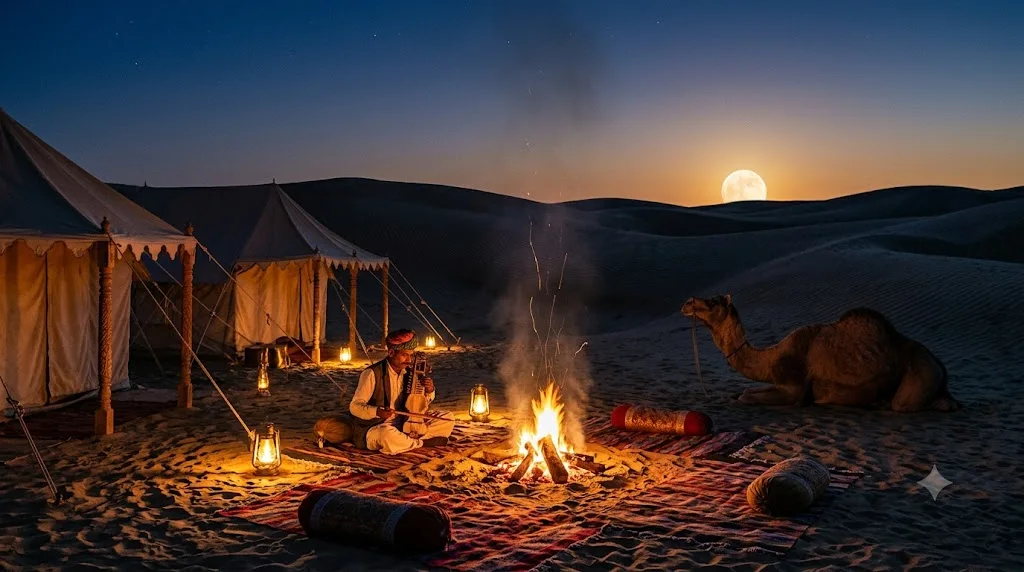
Desert camp under a rising moon
A warm, atmospheric image of a tented desert camp at dusk with lanterns and a full moon. Paste this prompt into ChatGPT, Gemini or Grok, change the parts in brackets to suit you, and generate.
- Written for
- ChatGPT, Gemini, Grok
- Status
- Tested 27 Sep 2026 in Gemini app (web), Flash mode with built-in image generation
- Test settings
- Default copy text pasted unchanged into a new Gemini chat. No reference image. First result used; only converted to WebP.
- Variability
- Layout, colours and small details change between runs. Gemini adds a small sparkle watermark in the corner.
Prompt
Scene: a small tented camp among rippled sand dunes in the Thar desert near Jaisalmer, canvas tents with carved wooden posts, low cushions and rugs around a crackling fire, a camel resting nearby.
Moment: a large full moon rising over the dunes, sparks drifting from the fire, a folk musician tuning a string instrument by the fire.
Light: blue-hour sky fading from indigo to amber at the horizon, warm lantern and firelight on the tents, long soft shadows on the sand.
Camera: 35mm lens at seated height, the fire in the foreground, dunes curving away.
Style: cinematic travel still, rich warm-cool contrast, fine sand texture.
Format: horizontal 16:9
Avoid: modern vehicles, plastic chairs, readable text, distorted camel legs, oversized cartoon moon, watermarks.
Customise
For example: the Thar desert near Jaisalmer.
For example: a folk musician tuning a string instrument by the fire.
Fields start with illustrative values; replace them with your own facts. The prompt updates as you type. Copy prompt copies your version.
How to use it
- Open an external image tool named above. Check Status for the provider actually tested.
- Paste the prompt. Replace anything in [BRACKETS] first, or use Customise.
- Send, then ask for small changes in follow-up messages.
How to use this prompt
- This prompt makes a new picture. Check the AI app named above and the real test recorded in Status.
- Fill Customise with what you want, or replace [BRACKETS] with the right details. Press Copy prompt and paste it into the image app you chose.
- When the picture is ready, check objects, hands, faces, writing and any detail that matters. Ask for one clear correction if something is missing.
Good to know
- The moon may come out larger than a real photo would show; ask for a smaller, realistic moon if needed.