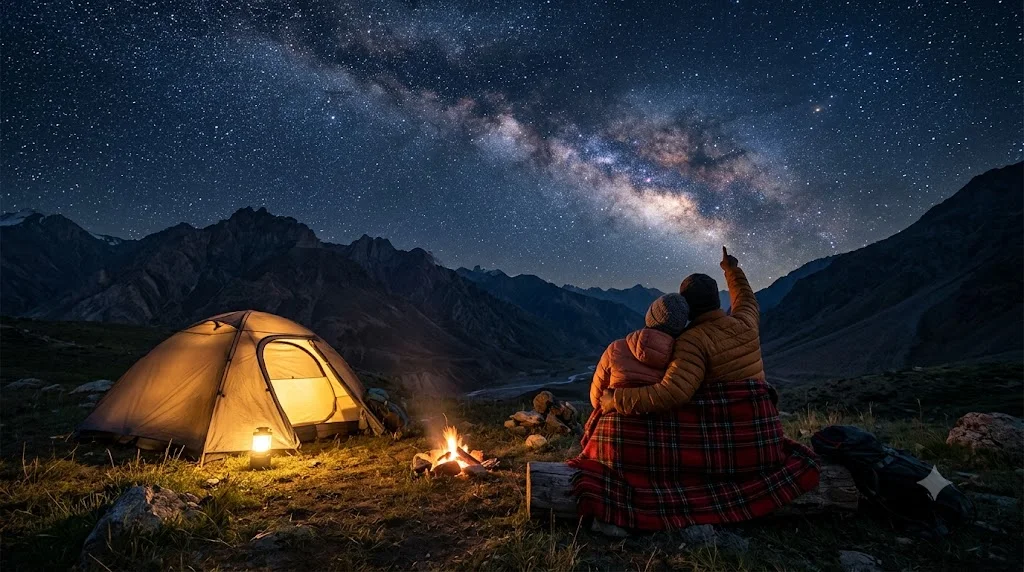
Starry Night Camping Couple
A dreamy wide image of a couple wrapped in a blanket by a glowing tent under the Milky Way. Paste this prompt into ChatGPT, Gemini or Grok, change the parts in brackets to suit you, and generate.
- Written for
- ChatGPT, Gemini, Grok
- Status
- Tested 27 Sep 2026 in Gemini app (web), Flash mode with built-in image generation
- Test settings
- Default copy text pasted unchanged into a new Gemini chat. No reference image. First result used; only converted to WebP.
- Variability
- Layout, colours and small details change between runs. Gemini adds a small sparkle watermark in the corner.
Prompt
Create an original image, no real people.
Scene: a small camp on a high meadow near Spiti Valley, a dome tent glowing warm from a lantern inside, a tiny campfire, dark mountain ridges, the Milky Way arching across a clear sky full of stars.
Moment or Pose: an adult couple sit close together on a log wrapped in one red plaid wool blanket, seen from behind and slightly to the side, one pointing up at the stars, the other resting their head on the pointing partner's shoulder.
Clothing: warm jackets and beanies.
Light: starlight and cool blue night ambience, warm orange glow from the tent and fire on the couple's backs.
Camera: 20mm wide angle, low tripod shot, long exposure look, stars as sharp points with no trails.
Style: astro landscape photograph, deep navy sky, crisp stars, gentle warm accents.
Format: horizontal 16:9.
Avoid: distorted hands, extra limbs, star trails, oversaturated purple sky, text, watermarks, logos.
Customise
For example: Spiti Valley.
For example: red plaid wool blanket.
Fields start with illustrative values; replace them with your own facts. The prompt updates as you type. Copy prompt copies your version.
How to use it
- Open an external image tool named above. Check Status for the provider actually tested.
- Paste the prompt. Replace anything in [BRACKETS] first, or use Customise.
- Send, then ask for small changes in follow-up messages.
How to use this prompt
- This prompt makes a new picture. Check the AI app named above and the real test recorded in Status.
- Fill Customise with what you want, or replace [BRACKETS] with the right details. Press Copy prompt and paste it into the image app you chose.
- When the picture is ready, check objects, hands, faces, writing and any detail that matters. Ask for one clear correction if something is missing.
Good to know
- This is a made-up couple shown from behind; for your own faces use a photo prompt. Some models over-brighten the Milky Way.