Kerala Backwaters Dawn Boat
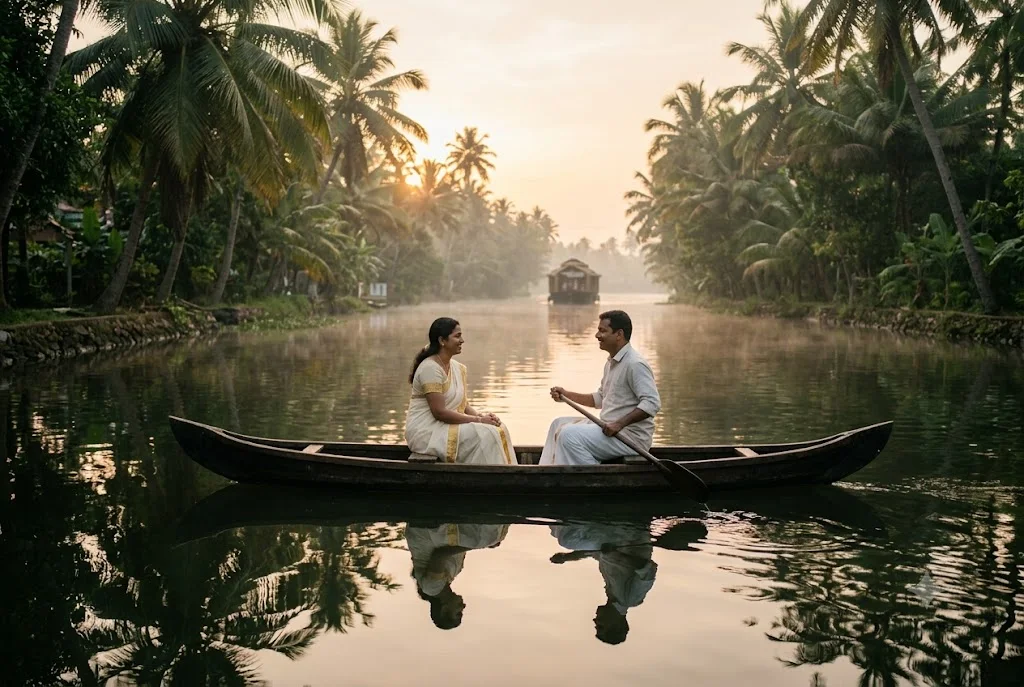
A calm, painterly image of a couple in a wooden boat drifting through misty backwaters at sunrise. Paste this prompt into ChatGPT, Gemini or Grok, change the parts in brackets to suit you, and generate.
Use your own couple photo in this scene →
- Written for
- ChatGPT, Gemini, Grok
- Status
- Tested 27 Sep 2026 in Gemini app (web), Flash mode with built-in image generation
- Test settings
- Default copy text pasted unchanged into a new Gemini chat. No reference image. First result used; only converted to WebP.
- Variability
- Layout, colours and small details change between runs. Gemini adds a small sparkle watermark in the corner.
Prompt
Create an original image, no real people.
Scene: the Kerala backwaters near Alleppey at dawn, a narrow palm-lined canal, still water holding the reflections of coconut palms, thin mist over the surface, a houseboat far away.
Moment or Pose: an adult couple sit facing each other in a small wooden country boat, one holding a paddle across their lap, both looking at each other and smiling; seen from the side at a slight distance so faces are small and natural.
Clothing: a cream kasavu saree with a gold border and a white mundu with a light shirt.
Light: sun rising behind the palms, soft peach and gold light breaking through the mist, gentle rim light on the couple.
Camera: 50mm, eye level from the bank, shallow depth of field, calm reflections.
Style: soft cinematic photograph with a quiet, dreamy mood.
Format: horizontal 3:2.
Avoid: distorted hands, extra limbs, warped boat, text, watermarks, logos, crowds.
Customise
For example: Alleppey.
For example: a cream kasavu saree with a gold border and a white mundu with a light shirt.
For example: soft cinematic photograph with a quiet, dreamy mood.
Fields start with illustrative values; replace them with your own facts. The prompt updates as you type. Copy prompt copies your version.
How to use it
- Open an external image tool named above. Check Status for the provider actually tested.
- Paste the prompt. Replace anything in [BRACKETS] first, or use Customise.
- Send, then ask for small changes in follow-up messages.
How to use this prompt
- This prompt makes a new picture. Check the AI app named above and the real test recorded in Status.
- Fill Customise with what you want, or replace [BRACKETS] with the right details. Press Copy prompt and paste it into the image app you chose.
- When the picture is ready, check objects, hands, faces, writing and any detail that matters. Ask for one clear correction if something is missing.
Good to know
- This is a made-up couple, not you; for your own faces, use a photo prompt. Palm reflections can look repeated.